Custom software
Built Around the Way You Work: A Workforce Planning Prototype
A bespoke workforce-planning prototype brings job allocation, inspector qualifications, availability, travel, overtime, and approvals into one operational view.
By Dryv Technology · Published 2026-11-12 · 5 min read
Assigning a job sounds straightforward—until the planner has to consider qualifications, availability, travel time, overtime, and the workload of the whole team at once. A choice that works for one job can create a problem elsewhere in the schedule.
Allocate is Dryv’s bespoke workforce-planning prototype for an inspection and certification business. It explores how a purpose-built application could bring those connected decisions into one workspace, shaped around the way the operation actually works.
The planning challenge behind each assignment
The next available inspector is not always the right person for a job. Planners may need to check who holds the required qualifications, who is available, how much work each person already has, and whether travel or overtime makes an assignment impractical. Some exceptions also need a manager’s approval.
These factors are connected. Adding one assignment can push someone over capacity, affect travel plans, or leave another job without a qualified person. When the information sits across separate calendars, spreadsheets, and conversations, it takes time to see the full impact.
One dashboard for the decisions that need attention
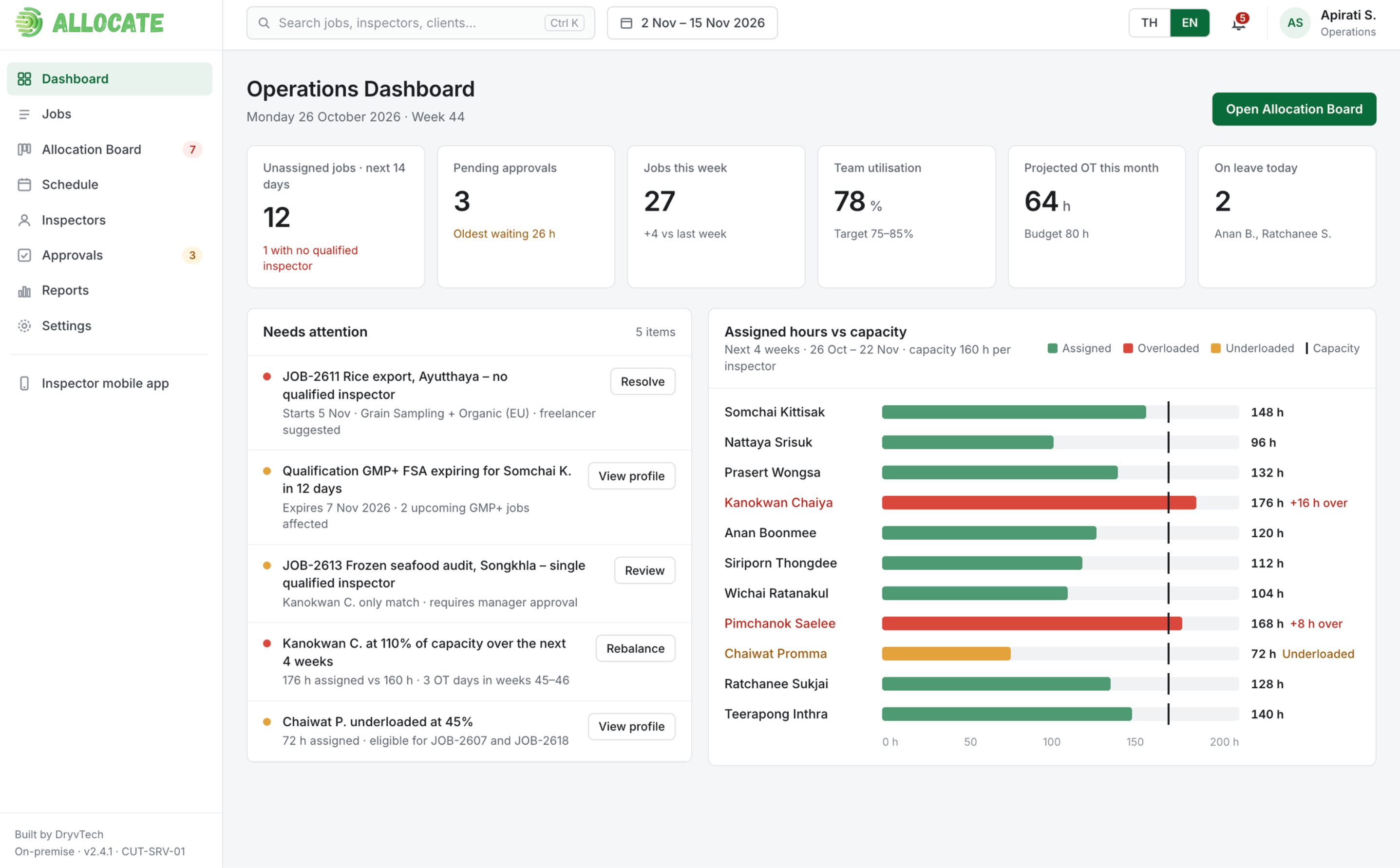
The prototype’s operations dashboard summarises upcoming unassigned jobs, approvals waiting for a decision, weekly workload, team utilisation, projected overtime, and leave. Instead of scanning separate tools, a planner can start with the items that may need action and then review capacity across the team.
Recommendations with reasons
On the allocation board, a suggested inspector can be reviewed alongside alternatives. The recommendation can be explained through relevant factors such as current workload, overtime, travel, experience, and preferences. Showing the reasoning helps a planner judge whether a match makes sense instead of treating a recommendation as an unexplained answer.
A shared view of schedule and capacity
A shared schedule brings assignments, leave, and capacity together. That makes it easier to notice pressure points, compare options, and understand what may change when a job is moved.
Keep the planner in control
The application is designed to support the planner, not make the final decision on their behalf. A person can confirm a recommendation, choose another inspector, or make a manual assignment. The proposed workflow can record why a recommendation was overridden and flag exceptions that need review.
Useful automation makes the options and trade-offs easier to see. People stay responsible for decisions that need their judgement.
Why build around the actual process?
Every inspection operation has its own rules: which qualifications matter, how workload is balanced, when overtime is acceptable, and which exceptions require approval. A bespoke application can make those agreed rules part of the workflow and show the information people need at the point of decision.
A focused scope also avoids adding features simply because they are common in other products. The goal is to support the work the team needs to do, with room to add integrations, reporting, or other capabilities if the process later calls for them.
A prototype is a way to test the workflow
This prototype makes a complex planning process tangible before a full implementation is committed to. Teams can explore the screens, challenge the recommendation rules, and refine what they need. It is a starting point for discussion and validation—not a claim that a finished production system has already been deployed.
For a bespoke application, Dryv’s proposed ownership approach is to hand over the application and its source code. The model described for this prototype does not include recurring software licence fees for the bespoke application itself; hosting, support, maintenance, and future enhancements can be scoped separately.
Start with the workflow that matters
A useful first step is to map one planning workflow: the information a coordinator checks, the rules they apply, the exceptions they handle, and the decisions they need to explain. A prototype can then make those requirements visible and easier to test with the people who will use it.
If your current tools do not quite fit the way your team assigns work, Dryv can help you explore a system built around that process.